
IT Support FAQs for UK businesses: Your questions answered before you choose a provider
Choosing an IT support provider shouldn't feel like decoding a foreign language. So, here's the short answer up front.
If your business has between 10 and 150 employees, managed IT support usually gives you the best balance of cost, security and reliability. Larger organisations with constant, complex IT demand often do better with an in-house team, backed by an outsourced IT provider. And if you're a very small business that can live with a bit of downtime, break-fix support can work.
Below, we've answered the questions UK businesses ask us most, in plain English. We cover how much IT support costs, what a managed IT service includes, how cyber security fits in, and what to look for when choosing (or switching) your IT support company. Jump to whichever section you need.
In this guide
- Managed IT vs in-house vs break-fix
- What is managed IT support?
- Cost and pricing
- Security and data protection
- Service, response times and contracts
- Choosing and switching provider
- Industry questions
1. Managed IT vs in-house vs break-fix
What's the difference between managed IT support, in-house IT and break-fix?
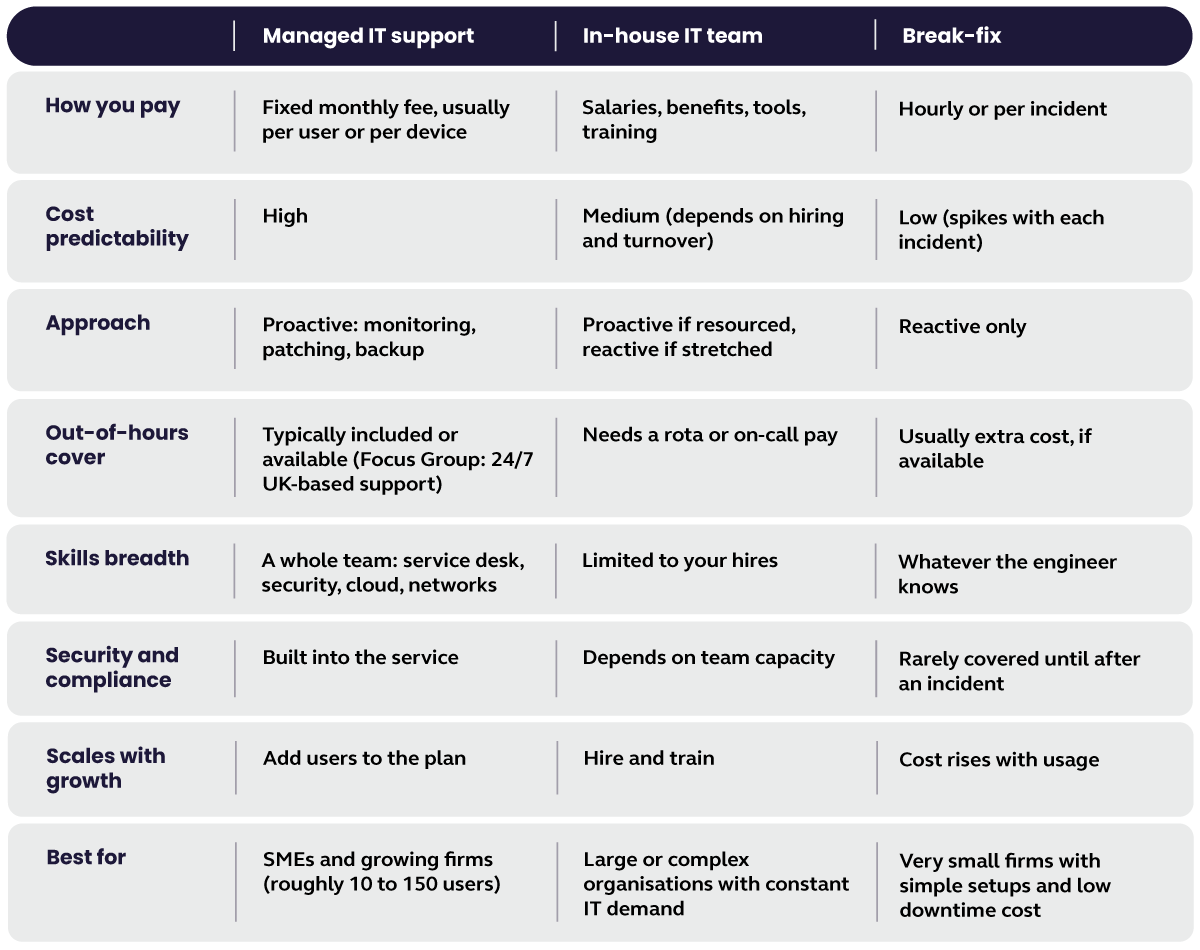
It comes down to who carries the risk.
- Managed IT support: A provider monitors, maintains, secures and supports your systems for a regular fee. They're paid to stop problems before they happen.
- In-house IT: You employ your own team, so you carry the cost of people, tools and cover.
- Break-fix IT support: You pay only when something goes wrong, usually by the hour or per call-out. The provider is paid when problems happen.
Managed IT, in-house IT and break-fix at a glance
When does managed IT support make the most sense?
Usually when:
- You have between 10 and 150 users and no full IT team.
- Downtime costs you money or customer trust.
- You handle personal or financial data and need to show sensible security controls.
- You'd rather budget a set amount each month than brace for surprise invoices.
When does in-house IT make more sense?
When IT is central to how you compete, you need engineers on site every day, or your systems are highly specialised. Even then, many larger firms go hybrid: an internal team for strategy and day-to-day needs, plus a managed IT provider for out-of-hours monitoring, security and busy periods.
Is break-fix IT support ever the right choice?
Sometimes. If you have a handful of staff, simple cloud-based tools and a high tolerance for downtime, it can work. The catch is that nobody is responsible for patching, backups or security until something fails, and the first call often comes in the middle of an outage or after an attack.
Is managed IT more expensive than break-fix or in-house?
It depends on how you count. A managed plan has a visible monthly fee, whereas break-fix costs stay hidden until something breaks. In-house costs go well beyond a salary: add recruitment, holiday and sickness cover, training, software, and the risk of losing key knowledge when someone leaves.
For a fair comparison, add up twelve months of all your IT spend, including downtime, and set it against a fixed monthly quote.
Can I combine IT support models?
Yes, and plenty of businesses do. Popular combinations are managed IT plus one internal IT lead, or a managed plan for everyday support with project work bought separately. Ask any provider how they work alongside an existing internal team.
2. What is managed IT support?
What does managed IT support include?
A typical managed IT service covers a service desk for your staff, patching for operating systems and third-party software, device monitoring, endpoint protection, backup and an account manager.
Focus Group's managed IT support plans include remote IT support, patch management, Microsoft 365 tenancy protection and backup, anti-virus and EDR protection, ransomware isolation, remote device monitoring and a dedicated account manager. Higher tiers add on-site support for critical issues, network and infrastructure support and 24/7 server monitoring.
What's the difference between remote and on-site IT support?
Remote support fixes most issues over a secure connection, and it's usually quicker than waiting for an engineer to travel. On-site support is for hardware, network equipment and critical incidents that can't be sorted remotely. Always check which on-site visits are included and which are charged.
Do I need to change my software licences?
Not necessarily. Focus Group's plans are licence-agnostic, so you can keep your existing Microsoft 365 or other licences or build these into a bundle of services.
Does managed IT support work for cloud-first businesses?
Yes. Even if most of your systems live in Microsoft 365 or other cloud services, you still need device management, identity security, cloud data backup and a service desk to call. Cloud services aren't automatically backed up in the way many businesses assume, so check exactly what your provider protects.
3. Cost and pricing
How much does managed IT support cost in the UK?
Most providers charge per user, per month. The figure depends on what's included, how many users you have and the level of cover.
Whoever you speak to, ask what's excluded, such as projects, hardware, licences and out-of-hours callouts.
What affects the price of IT support?
- Number of users and devices
- Hours of cover (business hours or 24/7)
- Whether on-site support is included or charged separately
- Security tooling (endpoint protection, backup, email security)
- Contract length
- Size and complexity of your network and servers
- Compliance requirements
Are there setup or onboarding fees?
Some providers charge to audit your environment and install their tools. Get this confirmed before you sign.
How can I compare IT support quotes fairly?
Ask every provider to quote against the same list: number of users, devices, locations, hours of cover, security tools, backup scope and response targets. Then compare the total yearly cost, not just the headline monthly price.
4. Security and data protection
Does IT support include cyber security?
Good managed IT support includes the basics: patching, endpoint detection and response (EDR), backup and ransomware protection. Advanced services such as penetration testing, security awareness training and a managed security operations centre (SOC) are often separate, so ask exactly what's covered.
What is EDR and why does it matter?
EDR stands for endpoint detection and response. It watches your devices for suspicious behaviour and can isolate an infected device before an attack spreads. That's a step beyond traditional anti-virus, which mainly blocks known threats.
Is Microsoft 365 backed up automatically?
Not in the way most people expect. Microsoft provides the platform, but your data is your responsibility. Third-party Microsoft 365 backup protects against accidental deletion, malicious activity and some ransomware scenarios. Focus Group's plans include Microsoft 365 tenancy protection and backup.
What is Cyber Essentials and do I need it?
Cyber Essentials is a UK government-backed certification that shows you have basic cyber security controls in place. It's often required to bid for public sector contracts and increasingly requested by larger customers. Ask your IT support provider whether they can help you prepare. Focus Group can support its customers with both Cyber Essentials and Cyber Essentials Plus.
What happens if we're hit by ransomware?
A well-prepared provider isolates affected devices, restores from clean backups and helps you report and recover. Without tested backups and monitoring, recovery can take days or even weeks. Ask any provider how often they test their backups.
5. Service, response times and contracts
How quickly will IT problems be fixed?
Response and resolution targets vary by priority. Critical issues (P1), such as a server outage, should always come first. Ask for these targets in your contract, along with what happens if they're missed.
Is IT support available 24/7?
Focus Group provides 24/7 UK-based IT support, backed by a team of over 300 technicians.
Is your IT support team based in the UK?
Yes, Focus Group's IT support is UK-based, across its network of 25 regional offices. It's worth asking any provider where their service desk and engineers are located, because it affects security, response times and how your data is handled.
How long is an IT support contract?
It varies so this should definitely be on your checklist. Also ascertain what happens when you add or remove users, and how price changes are handled at renewal.
Can I add or remove users during the contract?
Most plans allow it. Confirm how quickly changes take effect, and whether pricing steps up at set user bands.
6. Choosing and switching provider
How do I choose an IT support provider?
Use this checklist:
- Scope: What exactly is included and excluded?
- Response targets: Written down, by priority, with consequences for misses.
- Security: Are EDR, backup, patching and ransomware response included?
- Coverage: What are the support hours and on-site availability?
- Location: Where is the service desk based?
- Scale: Can they grow with you across sites and users?
- Account management: Is there a named person who knows your business?
- Proof: Do they have case studies, references and accreditations?
- Exit terms: What are the notice period, data handover and documentation arrangements?
How do I switch IT support provider?
A smooth switch has five steps:
- Audit your current environment.
- Agree a start date and handover plan.
- Gather admin credentials and documentation.
- Run both providers in parallel for a short period.
- Confirm everything is monitored and backed up before the old contract ends.
Ask your new provider to lead the process.
Is a large or small IT support provider better?
Smaller providers can feel more personal, but may lack 24/7 cover, specialist security skills or spare capacity at busy times. Larger providers bring breadth and resilience, but need a named account manager to keep things personal. Focus Group combines national scale with a dedicated account manager on its plans.
How do I know if my current IT support isn't good enough?
Watch for these warning signs:
- Repeat issues that never get fixed
- Slow responses
- No regular reporting
- No security advice
- Surprise invoices
- Being told "that's not covered" for basic needs
7. Industry questions
Do you provide IT support for hospitality, property and healthcare businesses?
Each sector has its own pressures. Hospitality relies on front desk and booking systems and WiFi at peak times. Property firms need secure mobile access and phone integration. Healthcare and dental practices handle sensitive patient data, so they need strong security and reliable backups.
Can IT support be combined with telecoms and connectivity?
Yes. Focus Group provides IT support, telecoms, connectivity, cyber security and mobile services, so you can bring everything under one supplier relationship.
Next steps
Not sure which IT support model fits your business? Talk to an IT specialist or [review Focus Group's IT support plans].